Affichage des articles dont le libellé est phone. Afficher tous les articles

mercredi 22 juin 2016

Nokia Lumia 520

Review : Nokia Lumia 520 


Nokia Lumia 520 

KEY FEATURES

  • 4-inch 480 x 800 pixel IPS screen
  • Windows Phone 8
  • 8GB internal memory, microSD
  • Dual-core 1GHz Snapdragon CPU
  • 5-megapixel main camera, no front camera
  • Manufacturer: Nokia
  • Review Price: £115.00


WHAT IS THE NOKIA LUMIA 520?

The Nokia Lumia 520 is Nokia’s most entry-level Windows Phone 8 mobile. You can get it free on even the cheapest contracts but it's also worth considering as a ouright purchase. You can find it for less than £100 and, if you shop around, you can get it for even less on a pay-as-you-go deal. While it lacks some of the neat touches you'll find on the more expensive Lumia 620, it proves that Windows Phone 8 is a great platform for budget phones.
  • 4-inch 480 x 800 pixel IPS screen
  • Windows Phone 8
  • 8GB internal memory, microSD
  • Dual-core 1GHz Snapdragon CPU
  • 5-megapixel main camera, no front camera
  • Manufacturer: Nokia
  • Review Price: £115.00

WHAT IS THE NOKIA LUMIA 520?

The Nokia Lumia 520 is Nokia’s most entry-level Windows Phone 8 mobile. You can get it free on even the cheapest contracts but it's also worth considering as a ouright purchase. You can find it for less than £100 and, if you shop around, you can get it for even less on a pay-as-you-go deal. While it lacks some of the neat touches you'll find on the more expensive Lumia 620, it proves that Windows Phone 8 is a great platform for budget phones.

NOKIA LUMIA 520 – DESIGN

Entry-level phones tend to feel cheap and, quite often, tacky. Less stylish and a good deal chunkier than mid or high-end phones, they also tend to suffer from build quality issues.
Nokia has managed to buck this with the Lumia 520. It is among the best phones in its class in this respect and while it uses a plastic battery cover, like virtually all budget phones, the backplate manages to cover the whole phone aside from the screen.
This gives the Lumia 520 a more unibody look that is comparable to high-end Nokia phones, even though this is certainly not a unibody mobile. The plastic cover is reasonably thick which helps it feel sturdy and tough. It also comes with a matt, textured finish which helps it avoid the pitfall of tacky glossy plastic that plagues many cheaper mobiles.

Nokia Lumia 520 6


While it's not as cute or pretty as the 620 the Nokia Lumia 520 manages to both look and feel like a classy phone. The 620's cover has a translucent layer that gives its finish an appearance of depth. On the 520 the plastic is quite basic and opaque.
From an ergonomics perspective it works very well, though. The textured finish means it's grippy and the carefully curved rear helps it sit in your hand comfortably.
You even get a few neat style touches. for example the Lumia-staple trio of physical buttons on the right edge of the phone are stark black to contrast punchily with the phone’s hue. There’s no labelling of what these buttons do either – another aesthetic blunder common to cheap phones.

NOKIA LUMIA 520 – SCREEN

The display on the Nokia Lumia 520 is a little bit bigger than on the Lumia 620. It is four inches across, which is quite generous for a phone priced this low. As well as being a shade larger than its more expensive brother, it’s also larger than the Samsung Galaxy Ace 2’s screen and Sony Xperia E’s display. And both of those tend to cost more.
However, it’s pretty basic in a number of different ways. Its viewing angles are fine, but the display quality is otherwise limited. There’s a reddish tint to the display, ensuring colour accuracy is average and the lack of any sort of reflection-battling layer reduces the impression of contrast. This means that the Lumia 520 a bit of a pain to use outdoors in sunlight — it's seriously reflective.
Nokia Lumia 520 7

The glass covering the display isn’t robustly toughened, either. It has some scratch resistance, but will flex under the pressure of a firm thumb prod. However, it’s far from the worst case we’ve seen, and any normal of pressure does not cause any screen distortion.
Screen resolution is 800 x 480 pixels, resulting in pixel density of 233ppi. Sharpness is well below the top phones out there, but for a low-end phone it’s perfectly good. Plus top brightness is impressively uncomfortable to gaze upon in most situation, and the screen size is large enough to happily read websites and play games on.

Apple iPod touch (6th generation)

ReviewApple iPod touch 

(6th generation)


It's almost surprising that Apple bothered to update the iPod touch in 2015. With most people already having a smartphone in their pockets, what place does a Wi-Fi only smartphone have in today's marketplace? Let's try to answer that, as Gizmag reviews the new 6th-generation iPod touch


The new iPod touch is a more attractive product than you might expect. It doesn't get any lighter or thinner than its predecessor (from way back in 2012), but it does hang onto the same awesome build while taking a huge step forward in raw power and camera quality.
We could jump into a long list of technical feature breakdowns (and we will cover some of that), but that one question remains: what the hell does one do with aniPod touch in a smartphone-saturated world? 
When the first iPod touch launched in 2007, the iPhone was still a novelty that was out of financial reach of a large portion of consumers. The iPod touch served as a cheaper way to see what the fuss was all about. A gateway product for future iPhone owners, somewhat miscategorized as an iPod. But today iPhones, Android phones and even some Windows Phones are in nearly every pocket or purse you come across. The gateway aspect died years ago.
The iPod touch always lacked a crystal-clear identity, but today its purpose is foggier than ever.
Our best answer is children. Many parents aren't comfortable buying smartphones for their kids until they become teens (if then), but they may still want their children to get in on the entertainment (and perhaps learning or productivity) that mobile devices can offer. So Mom and Pops are left to choose between a tablet like the iPad mini or a (slightly cheaper) portable media player like the iPod touch.
In that sense, the iPod touch is probably, first and foremost, a gaming device. More a rival to the Nintendo 3DS than to smartphones. 
Another possible use is for people who own Android phones, but still want access to the occasional iOS game or app (on the whole, it seems like many app-makers still prioritize iOS development). If you prefer Android for most of your phone needs, but wish you could dip your toes into the App Store from time to time, then the iPod touch isn't a bad way to do that.
So let's say you fall into one of those two categories: parent or iOS-curious Android phone owner. Is the new iPod touch a good buy, or worth the upgrade?
In many ways, yes. It has a newer and better system-on-a-chip than any iPad mini to date, and also costs less. And while you miss out on the larger screens that you'll find in Apple's tablets, you get a beautifully-designed aluminum body that's compact, ridiculously light and pleasantly thin. It's an absolute pleasure to hold. 
Its 4-inch screen does look downright shrimpy compared to today's flagship smartphones (it's the same size as the iPhone 5, 5s and 5c screens), but it's a great size for small kids' hands. And for adults, it's better for one-handed use than today's humongo-phones.
The iPod touch's screen has a familiar 326 pixels per inch (apart from the iPhone 6 Plus, every iPhone from 2010 to today has this same pixel density), and looks good. It has lower contrast than the iPhone 6 and 6 Plus do (800:1 vs. the 6's 1,400:1 and the 6 Plus' 1,300:1), but for a device in this price range, that isn't something to nitpick over.
As a gaming device, it's going to be future-proofed for several generations, as it runs the same Apple A8 chip found in the iPhones 6 and 6 Plus (though it is clocked a bit slower). Compared to the iPhone 6, the new iPod touch benchmarks (in Geekbench 3) at 85-86 percent as fast. Again, not too shabby for a device that costs less than one-third of the iPhone 6's full retail price. 
In terms of UI navigation, the iPod touch is also very zippy. Though some of its specs are the same as the 2012 model, this 2015 model stands head and shoulders above it as a significantly more powerful device. The 5th-generation iPod touch had an early 2011 A5 chip. This new iPod touch's A8 launched in late 2014. That's three and a half years worth of silicon innovation – practically an eternity in today's mobile tech world.
The new iPod touch's camera isn't quite on par with the latest iPhones' shooters (it's about iPhone 5 or 5c level quality), but this is another area where it's a huge step forward from the 2012 model.
Here are a few unedited (though downscaled to 1,060 px. wide) samples taken with the new iPod touch
If you already own a flagship smartphone from the last year or two, then you probably already have a camera that's roughly this good or better. But this is another area where the iPod touch is great for little ones: it can make for an outstanding first camera for a child.
Battery life is good, but also not breaking any new ground. In our benchmark (streaming video with brightness set at 75 percent), it dropped 12 percent per hour. For comparison's sake, that's a little bit better than the iPad Air 2 (14 percent) but off the mark of the iPad mini 3 (9 percent per hour).
For a Wi-Fi only device that largely serves as a portable gaming console, it would have been nice to see Apple push some battery life limits. But perhaps that would have meant adding some grams and millimeters to that lusciously light and thin build. We can live with that call. 
You need to fall into a certain niche to even consider buying an iPod touch in 2015. If you don't see a clear-cut need to buy one, then nothing we can say about our experience with it should change that. But if you want a relatively cheap entry into the world of iOS, either for you or a loved one, then this is one of the best ways to do it. You can pay a bit more for an iPad mini (with larger screen) or pay a bit less for the new iPod touch, with better performance.
The new iPod touch is available now, starting at US$200.

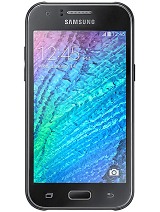
Samsung Galaxy J1

samsung galaxy J1

Spreadtrum SC8830 1.2 GHz , Cortex A7 
Graphics adapter ARM Mali-400 MP2 
Memory 512 MB 
Display 4.3 inch 5:3, 800x480 pixel, capacitive touchscreen, TFT, glossy: yes
Storage 4 GB Flash, 4 GB  , 1.1 GB free 
Weight 122 g ( = 4.3 oz / 0.27 pounds), Power Supply: 50 g ( = 1.76 oz / 0.11 pounds) 
Price 109 Euro 


The Samsung Galaxy J1 is available for an RRP of 109 Euros (~$122) and is therefore one of the cheapest devices within the Galaxy series. This is also noticeable when you look at the components, because customers only get standard parts: 4.3-inch TFT display with 800x480 pixels, 1.2 GHz dual-core processor, 512 MB of RAM and only 4 GB of integrated flash storage. At least, the manufacturer has integrated some features that are not found in the current top models Galaxy S6 and Galaxy S6 Edge. It is easy to change the battery of theGalaxy J1 and expand the storage via microSD card.
The competition in this price range is pretty big, which is why the devices are getting better and better. Suitable comparison devices for the Galaxy J1 are the Motorola Moto E 2015, the Nokia Lumia 535 as well as the Honor Holly. The LG L Fino and the Huawei Y540 are also rivals. 

Case


The Galaxy J1 still uses the old design and is therefore easily recognizable as a Samsungsmartphone. The corners of the polycarbonate chassis are rounded, along the top is a chrome-colored stripe and under the display is the central home button, which is flanked by the two Android touch buttons. This means the Galaxy J1 basically does not differ from many more expensive Galaxy smartphones, which is actually a compliment when you consider the low price. The back cover can be removed and gives access to the replaceablebattery, the micro-SIM slot as well as the slot for microSD cards.
The comparison devices have larger displays, which is obviously noticeable when you look at the dimensions. With a weight of just 122 grams (~4.3 oz), the Galaxy J1 is comfortable to hold, and the one handed operation of the 4.3-inch screen is quite good with normal hands. The thickness of 8.8 millimeters (~0.35 in) is also very good in comparison, but the camera module is slightly protruding at the back. The compact dimensions contribute to the stability, the smartphone cannot be twisted (no creaking) and pressure does not damage the case. The good quality impression is somewhat affected by the hardware buttons at the sides, because they are slightly wobbly. However, considering the price, the overall impression in this section is very good.
In addition to our blue review unit, Samsung Galaxy J1 also comes in white and black.

Case


The Galaxy J1 still uses the old design and is therefore easily recognizable as a Samsungsmartphone. The corners of the polycarbonate chassis are rounded, along the top is a chrome-colored stripe and under the display is the central home button, which is flanked by the two Android touch buttons. This means the Galaxy J1 basically does not differ from many more expensive Galaxy smartphones, which is actually a compliment when you consider the low price. The back cover can be removed and gives access to the replaceablebattery, the micro-SIM slot as well as the slot for microSD cards.
The comparison devices have larger displays, which is obviously noticeable when you look at the dimensions. With a weight of just 122 grams (~4.3 oz), the Galaxy J1 is comfortable to hold, and the one handed operation of the 4.3-inch screen is quite good with normal hands. The thickness of 8.8 millimeters (~0.35 in) is also very good in comparison, but the camera module is slightly protruding at the back. The compact dimensions contribute to the stability, the smartphone cannot be twisted (no creaking) and pressure does not damage the case. The good quality impression is somewhat affected by the hardware buttons at the sides, because they are slightly wobbly. However, considering the price, the overall impression in this section is very good.
In addition to our blue review unit, Samsung Galaxy J1 also comes in white and black.

HTC 10

KEY FEATURES

  • 5.2-inch quad-HD display
  • Snapdragon 820
  • 4GB RAM
  • 32/64GB internal storage
  • USB-C
  • 3,000 mAh battery
  • Android 6.0.1 & Sense 7.0
  • 12 UltraPixel camera w/OIS
  • 5 UltraPixel selfie camera w/OIS
  • Manufacturer: HTC
  • Review Price: £569.99
WHAT IS THE HTC 10?

2016 has been a fine year for smartphones. The Samsung Galaxy S7, LG G5 and Huawei P9 have all been excellent devices and now it’s the turn of HTC. After a poor 2015 – both the One A9 and Desire 530 disappointed – I can safely say the Taiwanese company is back.

The HTC 10 is a fantastic device. Probably the best HTC has ever crafted. It combines a lovely build with a strong set of software features to create one of the best Android experiences out there.

All that I can say is that the iPhone 7 better be something very special to match the Android big-boys this year.


HTC 10 video review

HTC 10 – DESIGN

While the HTC 10 takes the brand’s flagship smartphone in a new design direction, it’s still very familiar. The front is stripped from the One A9, and the back is a tweaked and tuned version of the rear casing from the One M9.
It’s far from original and looking at it face-on you’d be forgiven for confusing it with an iPhone or Samsung Galaxy S7, but for me it’s the perfect mix of style and substance.

First off, this phone is clearly made from metal – and proud of it. The back is cool to the touch, with an elegant curve that helps it sit comfortably in your hand. This curve flows into some heavily chamfered edges that add a bit of much-needed flair.
It's a divisive design choice, though. I really like them as they give your fingers somewhere to sit, but the some of the TrustedReviews team were less impressed, claiming they’re far too shiny.

front

The camera sensor sits bang in the centre, and while it doesn’t have what I'd consider a ‘hump’, it does jut out ever so slightly. Alongside it is an LED flash and a space for the laser autofocus system.
Like any metal phone, the sleek design is broken up by two bands of antenna lines that run around the top and bottom. These don’t stand out anywhere near as much as they do on the iPhone and they feel like part of the design, rather than something that has to be there.
Along the side you’ve got the usual combination of a volume rocker and sleep/wake button, the latter of which is bevelled and easily identifiable even when the phone is in your pocket.
Most other phones have switched to a single tray that houses both the Nano SIM tray and a microSD card, but the HTC 10 still has one tray on each side. I’d like to see this combined to makes things sleeker, but it makes little difference in reality.
Related: Best smartphone

htc10 7

Flip the phone over and the HTC 10 is one of the cleanest devices around. HTC has even removed its brand logo – a minimal change that makes a big difference.
Compared to last year’s One M9 flagship, there are a couple of major differences here.
There’s now a capacitive home key sitting below the display that isn’t so much of a button but a touchpad. Like pretty much every worthwhile Android phone this year it features a fingerprint scanner inside, but coming from the Galaxy S7 it feels strange not to get get that satisfying ‘click’ when I press down.
HTC has also switched to capacitive Back and Recent Apps keys, as opposed to on-screen versions, and these sit either side of the home button. It’s all down to personal preference whether you prefer physical or virtual buttons, but it does free up that extra bit of screen real estate.

htc10 5

The phone comes in black, silver and gold
Whereas LG took plenty of risks with its funky modular design of the G5, HTC has played it relatively safe here. That’s not a dig, though. In fact I'd say the HTC 10 is my favourite phone of the year so far when it comes to the overall look and feel.
It almost matches the Galaxy S7 for size, though it’s marginally taller and noticeably weightier. It feels reassuringly expensive and solid, which is something I just can’t say about the LG G5.
It’s the precision, though, that wins it for HTC. Everything is symmetrical, with the headphone jack, camera sensor and USB-C port on the bottom, all in line with each other. I would have preferred to see that headphone port on the bottom, but that’s just a minor quibble.
Considering its history, it’s no surprise that HTC has designed a stunning looking phone. It hasn’t taken risks and opted for something more ‘out there’, but it still has charm and is an absolute pleasure to use.

HTC 10 – SCREEN

HTC has updated just about every part of the One M9 for its successor, and the display is no exception.
It’s grown slightly to 5.2-inches, but the bigger upgrade is the resolution. It’s much more pixel dense now, thanks to the 2560 x 1440 quad-HD resolution, and it covers 99.9% of the sRGB colour gamut. It’s a mightily impressive panel, though as it's LCD – 5th-generation LCD, to be precise – it does lack a little of the vibrancy of Samsung’s Super AMOLED screen. It’s not far off, and it’s hard to notice unless you have both phones sat next to each other.
htc10 31

It’s a lovely display to look at. Colours are punchy and bright, without being oversaturated, and they’re accurate too. The wide colour gamut is great for watching video as it was originally intended and accurately editing snaps, making this a strong media machine.
There is a slight pinkish tinge to the display when it’s tilted to the side and this dampens viewing angles, but it’s not a deal-breaker. Viewing angles are still great and reflections are kept to a minimum, but colours are skewed ever so slightly when you’re not looking directly at it. I had a similar issue with the Galaxy S7 Edge, so it’s certainly not a problem exclusive to HTC’s displays.
The HTC 10 is missing a feature both the LG G5 and Galaxy S7 tout, which is an Always-On mode. This clever method of displaying your most recent notifications when the display is seemingly off is far from essential, but it’s a useful extra that I’ve grown to like after using those two phones. LG managed it with an LCD screen, so I’m not sure why HTC hasn’t tried anything similar.
What it does offer over its rivals is improved brightness. Well, in certain situations. In regular use, the maximum brightness on the HTC 10 is much brighter than that of the LG G5 and Galaxy S7, though it doesn’t feature the trick used by those two where it can boost brightness even more in direct sunlight. Still, the HTC 10 is perfectly usable outdoors. 

Accent a455


Accent a455

ACCENT A455

  • Dimension : 134.5x66.5x10.55mm  harging Adapteur : 5V 1A micro-USB / 3000mAh

    • Processeur : MTK6582M Quad-Core 1.3GHz
    • Système d'exploitation : Android 4.4
    • La taille de l'écran LCD : 4.5'’ IPS - FWVGA
    • Résolution : 480x854
    • RAM : 512MB
    • Stockage : 4GB
    • Freqs GSM / GPRS / EDGE: SIM 2 2G (GSM/GPRS/ EDGE 900/1800/1900 MHz)
    • UMTS / WCDMA / 3G freqs: SIM 1 2G/3G (WCDMA 900/2100 MHz)
    • Caméra Frontale : 2.0MP
    • Caméra arrière : 5.0MP
    • La lumière du flash : Oui
    • WIFI : Oui
    • Bluetooth : Oui
    • GPS : Oui
    • 3G frequence : WCDMA / 900 / 2100 MHz
    • Lecteur audio : Audio encode • MR audio decode • MP3 • AMR,AAC,MIDI,WAV,WMA
    • Lecteur vidéo : mp4,3gp,AVI,MWV
    • Double Sim : Oui
    • Audio Jack : 3.5mm
    • USB connecteur : Micro 5 pin, USB 2.0
    1. ACCENT A455